
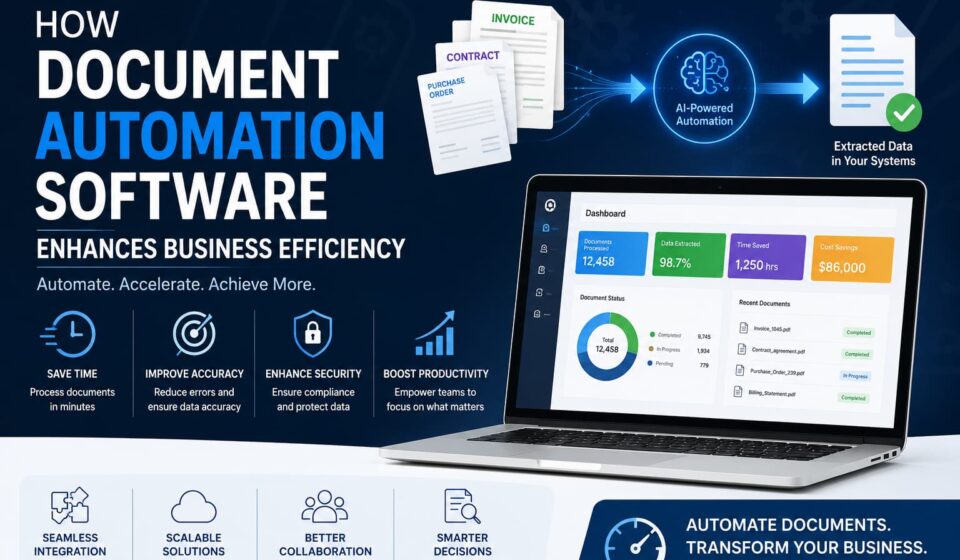

In today’s fast-paced digital economy, businesses generate thousands of documents every month—from invoices and contracts to purchase orders, compliance records, employee forms, and customer applications. Managing these documents manually is not only time-consuming but also costly and prone to errors.
As organizations continue their digital transformation journey, document automation software has become a critical business tool for improving operational efficiency, reducing costs, and accelerating workflow processes. According to industry reports, over 70% of organizations are actively investing in automation technologies to streamline document-intensive operations and improve productivity.
By replacing repetitive manual tasks with AI-powered automation, businesses can process documents faster, improve accuracy, enhance compliance, and free employees to focus on strategic work that drives growth.
What Is Document Automation Software?
Document automation software is a technology solution that automatically captures, extracts, processes, validates, stores, and manages information from business documents.
Using advanced technologies such as:
- Artificial Intelligence (AI)
- Machine Learning (ML)
- Optical Character Recognition (OCR)
- Natural Language Processing (NLP)
- Workflow Automation
the software can identify relevant data within documents and automatically transfer it into business systems without manual intervention.
Modern document automation platforms integrate seamlessly with:
- ERP systems
- CRM platforms
- Accounting software
- Cloud storage solutions
- HR management systems
- Supply chain applications
This enables organizations to create a fully automated document workflow that improves efficiency across departments.
Read More: Workflow Automation for Accountants
Why Businesses Are Adopting Document Automation
Traditional document processing creates several operational challenges:
- Manual data entry consumes valuable employee time.
- Human errors result in costly corrections.
- Slow approval cycles delay business operations.
- Compliance requirements become harder to manage.
- Document retrieval can be inefficient and frustrating.
Document automation eliminates these bottlenecks by creating intelligent workflows that automatically process and route information where it’s needed.
The result is a faster, more agile, and highly productive organization.
Key Benefits of Document Automation Software
1. Significant Time and Cost Savings
Manual document processing requires substantial labor resources. Employees often spend hours reviewing paperwork, entering information, and correcting mistakes.
Document automation dramatically reduces processing times by automatically:
- Extracting data
- Classifying documents
- Routing approvals
- Updating records
- Generating reports
Tasks that once required hours or even days can now be completed within minutes.
Business Impact
- Reduced labor costs
- Faster turnaround times
- Improved employee productivity
- Increased operational efficiency
- Higher return on investment (ROI)
2. Improved Accuracy and Reduced Human Errors
Even experienced employees make mistakes when processing large volumes of documents.
Common issues include:
- Data entry errors
- Duplicate records
- Missing information
- Incorrect classifications
- Misfiled documents
AI-powered document automation software uses intelligent validation rules to ensure information is extracted accurately and verified before processing.
Benefits
- Higher data accuracy
- Fewer costly mistakes
- Better customer experiences
- Improved reporting quality
- Reduced rework
3. Stronger Compliance and Data Security
Businesses operating in regulated industries must comply with strict standards regarding data handling and document retention.
Document automation software helps organizations maintain compliance through:
- Automated audit trails
- Secure document storage
- Encryption protocols
- Role-based access controls
- Data retention policies
- Automated compliance reporting
Many leading solutions support standards such as:
- GDPR
- HIPAA
- SOC 2
- ISO 27001
- PCI DSS
This reduces regulatory risks while strengthening data protection.
4. Enhanced Team Collaboration
Traditional document sharing often relies on lengthy email chains and disconnected file storage systems.
Cloud-based document automation platforms provide:
- Centralized document repositories
- Real-time collaboration
- Version control
- Automated notifications
- Instant document access
This allows teams to collaborate efficiently regardless of location.
Results
- Faster approvals
- Better communication
- Improved project visibility
- Higher productivity
5. Faster Business Decision-Making
When documents move quickly through workflows, managers gain access to accurate information faster.
Automated systems provide:
- Real-time analytics
- Performance dashboards
- Workflow monitoring
- Instant reporting
This empowers leaders to make informed decisions based on current data rather than outdated reports.
6. Scalability for Business Growth
As organizations expand, document volumes increase dramatically.
Without automation, businesses often need additional staff to manage growing workloads.
Document automation software enables companies to:
- Handle larger document volumes
- Maintain processing speed
- Reduce hiring costs
- Support business expansion
This makes automation a long-term growth strategy rather than simply a productivity tool.
Industry-Specific Use Cases
Finance and Accounting
- Invoice processing
- Accounts payable automation
- Expense management
- Financial reporting
- Tax document handling
Healthcare
- Patient intake forms
- Insurance claims
- Medical records management
- Regulatory compliance documentation
Human Resources
- Employee onboarding
- Payroll documentation
- Benefits administration
- Performance review management
Logistics and Supply Chain
- Bills of lading
- Shipping documentation
- Inventory records
- Customs paperwork
Legal Services
- Contract generation
- Legal document review
- Case file management
- Compliance tracking
Real-World Success Stories
National Debt Relief – 10x Faster Document Processing
National Debt Relief faced significant delays due to high volumes of customer paperwork and manual document handling.
After implementing Docsumo, the company achieved:
- 10x faster document processing
- Reduced manual workload
- Faster customer approvals
- Improved operational efficiency
Biagi Bros – 95% Automated Operations
Biagi Bros needed a scalable solution to manage logistics and transportation documentation.
Using Docsumo, the company successfully:
- Automated 95% of warehousing workflows
- Reduced manual processing requirements
- Increased scalability
- Improved operational performance
Emerging Trends in AI-Powered Document Automation
The future of document automation is being shaped by advanced AI technologies.
Key trends include:
Intelligent Document Processing (IDP)
Combines AI, OCR, and machine learning to understand complex documents and extract contextual information.
Generative AI Integration
Helps summarize documents, generate reports, and automate communications.
Predictive Workflow Automation
Uses historical data to predict workflow bottlenecks and optimize business processes.
Hyperautomation
Integrates document automation with robotic process automation (RPA), AI, and analytics for end-to-end business automation.
How to Choose the Best Document Automation Software
When evaluating document automation solutions, consider the following factors:
1. Integration Capabilities
Ensure compatibility with:
- ERP platforms
- CRM systems
- Accounting software
- Cloud storage solutions
2. AI and OCR Accuracy
Look for platforms that offer high extraction accuracy and continuous learning capabilities.
3. Scalability
Choose software that can handle increasing document volumes without performance issues.
4. Security and Compliance
Verify support for:
- GDPR
- HIPAA
- SOC 2
- ISO certifications
5. Workflow Customization
The best solutions allow businesses to create custom workflows, approval rules, and automation triggers.
6. Analytics and Reporting
Advanced reporting capabilities help monitor performance and identify optimization opportunities.
Frequently Asked Questions
What is document automation software?
Document automation software uses AI, OCR, and workflow automation technologies to automatically process, extract, manage, and organize information from business documents.
How does document automation improve efficiency?
It eliminates manual data entry, reduces errors, speeds up workflows, improves compliance, and increases employee productivity.
Which industries benefit most from document automation?
Finance, healthcare, legal, logistics, insurance, manufacturing, and human resources sectors see significant benefits from automation.
Is document automation secure?
Yes. Most enterprise-grade solutions include encryption, audit trails, access controls, and compliance features to protect sensitive information.
What is the difference between OCR and document automation?
OCR converts document images into machine-readable text, while document automation uses OCR plus AI and workflow tools to process and manage documents automatically.
Conclusion
Document automation software has become an essential component of modern business operations. By leveraging AI-powered document processing, organizations can reduce costs, eliminate manual errors, strengthen compliance, improve collaboration, and scale more efficiently.
Whether you’re processing invoices, contracts, customer applications, or compliance documents, automated document workflows provide measurable improvements in productivity and operational performance.
Businesses that invest in intelligent document automation today are positioning themselves for faster growth, stronger competitiveness, and long-term digital transformation success.