
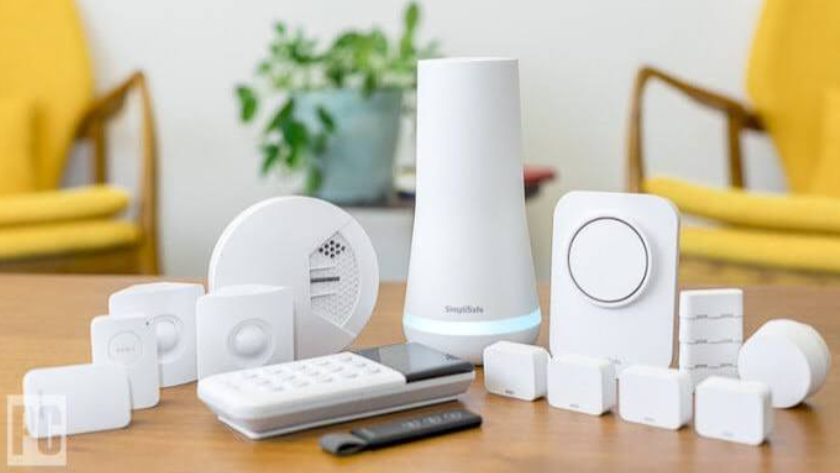

Best Smart Home Devices for Beginners
A few months ago, I helped a friend set up their very first smart home. Their biggest concern wasn’t the cost—it was whether all the gadgets would actually work together. Honestly, I had the same question when I bought my first smart speaker years ago.
I was skeptical at first, but after comparing it with my previous setup of ordinary light switches and timers, I quickly realized how much easier everyday life could become. Today, my daily routine includes asking my smart speaker for the weather, turning off forgotten lights with my phone, and scheduling devices to save energy automatically.
If you’re completely new to smart home technology, you’re in the right place.
In this guide, I’ll walk you through the best smart home devices for beginners, explain which products are worth buying first, and share practical tips based on real-world use. Whether you use Amazon Alexa, Google Home, or Apple HomeKit, these beginner-friendly devices can help you create a smarter, safer, and more convenient home.
Why Start with Smart Home Devices?
Smart homes aren’t just about flashy technology anymore.
According to industry reports, millions of households now use at least one connected device, and the number continues to grow each year. The biggest reason is simple: convenience.
With the right devices, you can:
- Control lights without leaving the couch.
- Lock your doors remotely.
- Monitor your home while traveling.
- Save energy through automation.
- Receive security alerts on your smartphone.
- Create routines that simplify your daily schedule.
In my experience, the biggest surprise wasn’t how “smart” the devices were—it was how much time they saved every single day.
Read More: Home Remodeling Ideas for Small Houses
What Makes a Device Beginner-Friendly?
Not every smart gadget is ideal for someone just starting out.
When I spent three weeks testing several entry-level devices, I focused on features that matter most to beginners.
The best beginner smart home devices should:
- Be easy to install.
- Work with popular voice assistants.
- Have user-friendly mobile apps.
- Require little or no wiring.
- Offer reliable customer support.
- Be reasonably priced.
Brands like Amazon, Google, Apple, Philips Hue, TP-Link, Ring, and Eufy consistently meet these expectations.
Best Smart Home Devices for Beginners
1. Smart Speaker (Your Smart Home’s Control Center)
If you’re only buying one smart home device, make it a smart speaker.
Everything becomes easier once you have a central voice assistant.
Popular options include:
- Amazon Echo
- Google Nest Audio
- Apple HomePod mini
These speakers allow you to:
- Play music
- Set alarms
- Control compatible smart devices
- Check the weather
- Ask questions
- Create daily routines
My Experience
My biggest concern was whether voice commands would actually become part of my routine.
Surprisingly, they did.
Instead of reaching for my phone dozens of times a day, I simply asked Alexa to start timers while cooking, remind me about meetings, or switch off lights before bed.
It’s one of those features you don’t realize you’ll use constantly until you have it.
2. Smart Light Bulbs
Lighting is usually the easiest place to begin your smart home journey.
Instead of replacing fixtures, you simply replace the bulb.
Popular brands include:
- Philips Hue
- TP-Link Kasa
- Wyze
- Sengled
- GE Cync
Most smart bulbs allow you to:
- Turn lights on or off remotely.
- Adjust brightness.
- Change colors.
- Create schedules.
- Control lights with voice assistants.
Why I Recommend Them
What I loved most about this product was how easy it was to automate everyday routines.
For example, I scheduled my bedroom lights to gradually brighten every morning instead of waking up to a loud alarm.
It sounds simple, but it genuinely made mornings feel less stressful.
3. Smart Plugs
Smart plugs are one of the most affordable ways to make ordinary appliances “smart.”
Simply plug one into a wall outlet, then connect almost any device.
Examples include:
- Coffee makers
- Lamps
- Fans
- Humidifiers
- Holiday decorations
Popular brands include:
- TP-Link Kasa
- Amazon Smart Plug
- Meross
- Wemo
Real-Life Use Case
During winter, I scheduled a small space heater to warm my office fifteen minutes before work.
Instead of walking into a freezing room, everything was already comfortable.
It’s a tiny convenience—but after using it daily, I wouldn’t want to go back.
Smart Displays
Think of a smart display as a smart speaker with an interactive screen.
Popular options include:
- Amazon Echo Show
- Google Nest Hub
Besides voice commands, they can display:
- Weather forecasts
- Recipes
- Security camera feeds
- Calendar events
- Video calls
- Shopping lists
- Smart home dashboards
If several people live in your home, a smart display often becomes the family’s central information hub.
Why Beginners Love Smart Displays
I didn’t think I needed one at first.
Then I started following recipes while cooking.
Instead of constantly touching my phone with messy hands, I simply asked the display to show the next step.
It also became surprisingly useful for checking front-door cameras without opening another app.
Choosing the Right Smart Home Ecosystem
Before buying multiple devices, it’s worth deciding which ecosystem you’ll use.
Amazon Alexa
Best for:
- Largest device compatibility
- Affordable products
- Excellent routines
- Voice control
Google Home
Great for:
- Google services
- Android users
- Smart search results
- Natural conversations
Apple HomeKit
Ideal for:
- iPhone users
- Privacy-focused households
- Secure automation
- Apple ecosystem integration
In my experience, sticking with one ecosystem from the beginning makes setup much easier.
Common Beginner Mistakes
When people build their first smart home, they often make the same mistakes.
Here are a few to avoid:
Buying Too Many Devices at Once
Start with one or two products.
Learn how they work before expanding.
Ignoring Compatibility
Always check whether devices support:
- Amazon Alexa
- Google Assistant
- Apple HomeKit
- Matter
- Thread
Compatibility prevents frustration later.
Forgetting About Wi-Fi
Every smart device depends on a reliable wireless network.
If your Wi-Fi struggles in certain rooms, consider upgrading your router or adding a mesh Wi-Fi system before purchasing more devices.
Reliable connectivity makes every smart home experience smoother.
5. Smart Thermostats
If lowering your energy bills is a priority, a smart thermostat is one of the best upgrades you can make.
Unlike traditional thermostats, smart versions learn your routine and automatically adjust heating or cooling throughout the day.
Some of the most trusted brands include:
- Google Nest Learning Thermostat
- ecobee Smart Thermostat Premium
- Honeywell Home
- Amazon Smart Thermostat
Why They’re Worth It
Features often include:
- Remote temperature control
- Energy usage reports
- Automatic scheduling
- Voice assistant compatibility
- Geofencing that adjusts settings when you leave or arrive home
My Experience
After comparing with my previous thermostat, the difference was obvious.
Instead of constantly adjusting temperatures, my smart thermostat learned when I usually left for work and when I returned home. Within the first month, I noticed my HVAC system wasn’t running as often, and the house stayed comfortable without any extra effort.
6. Smart Security Cameras
Home security is another area where smart technology shines.
Modern cameras let you check your home from almost anywhere using your smartphone.
Popular beginner-friendly brands include:
- Ring
- Eufy
- Arlo
- Blink
- Google Nest Cam
Many cameras offer:
- HD video
- Night vision
- Motion detection
- Two-way audio
- Cloud or local storage
- Mobile notifications
Real-Life Example
I remember leaving for a weekend trip and suddenly wondering if I’d closed the garage door. Instead of driving back, I simply opened the app, checked the camera feed, and confirmed everything was secure.
That peace of mind alone made the investment worthwhile.
7. Video Doorbells
A smart video doorbell lets you see who’s at your front door—even when you’re not home.
Top options include:
- Ring Video Doorbell
- Google Nest Doorbell
- Eufy Video Doorbell
- Arlo Essential Video Doorbell
These devices can:
- Notify you when someone approaches.
- Record visitors.
- Allow two-way conversations.
- Help monitor package deliveries.
For beginners, they’re surprisingly easy to install and can significantly improve home security.
8. Smart Locks
One of the smartest upgrades for busy households is replacing a traditional lock with a smart one.
Popular models come from:
- Yale
- Schlage
- August
- Kwikset
Features often include:
- Keyless entry
- Fingerprint access
- Temporary guest codes
- Auto-lock timers
- Remote locking and unlocking
What I Loved Most
What I loved most about this product was never wondering whether I locked the front door.
A quick glance at the app gave me instant confirmation, and if I forgot, I could lock it remotely in seconds.
9. Robot Vacuums
Cleaning isn’t exactly anyone’s favorite hobby.
Fortunately, robot vacuums handle much of the work automatically.
Popular brands include:
- iRobot Roomba
- Roborock
- Shark
- Eufy
- Ecovacs
Many models can:
- Map your home.
- Avoid obstacles.
- Schedule daily cleaning.
- Return to their charging dock automatically.
My Daily Routine
My daily routine includes scheduling my robot vacuum to clean while I’m working.
By the time I finish for the day, the floors are already clean. It’s one less chore to think about, especially in high-traffic areas.
10. Smart Sensors
Smart sensors may not be exciting, but they’re incredibly useful.
Examples include:
- Motion sensors
- Door sensors
- Window sensors
- Water leak sensors
- Smoke and carbon monoxide detectors
These devices can send instant alerts when they detect unusual activity, helping prevent costly damage or improving home security.
Creating Smart Home Routines
One of the biggest advantages of a smart home is automation.
Instead of controlling each device individually, you can create routines that trigger multiple actions simultaneously.
Here are a few beginner-friendly ideas:
Good Morning Routine
- Bedroom lights gradually turn on.
- Thermostat adjusts to a comfortable temperature.
- Smart speaker reads the weather and calendar.
- Coffee maker starts brewing (using a smart plug).
Leaving Home Routine
- Lights switch off.
- Doors lock automatically.
- Security cameras activate.
- Thermostat switches to energy-saving mode.
Bedtime Routine
- Living room lights dim.
- Bedroom lamp turns on.
- Front door locks.
- White noise begins playing through a smart speaker.
Once I created my first automation, I found myself looking for more ways to simplify everyday tasks. It’s surprisingly satisfying when your home works with you instead of requiring constant attention.
Common Smart Home Problems (and Easy Fixes)
Even the best devices can run into occasional issues.
Wi-Fi Connection Problems
If devices disconnect frequently:
- Restart your router.
- Place devices closer to your Wi-Fi access point.
- Consider a mesh Wi-Fi system for larger homes.
Compatibility Issues
Before purchasing new devices, check whether they support:
- Amazon Alexa
- Google Assistant
- Apple HomeKit
- Matter
- Thread
Choosing compatible products from the start saves time and frustration.
Notification Overload
Too many alerts can become overwhelming.
Customize app settings so you only receive important notifications, such as security events or water leak warnings.
Quick Tips for First-Time Buyers
If you’re just getting started, keep these tips in mind:
- Start with one ecosystem (Alexa, Google Home, or Apple HomeKit).
- Buy one or two devices before expanding.
- Read user reviews and compatibility information.
- Use strong passwords and enable two-factor authentication.
- Keep firmware updated for security and performance.
- Invest in a reliable Wi-Fi network.
A little planning goes a long way toward creating a smart home that’s easy to manage.
Frequently Asked Questions
What is the best smart home device for beginners?
A smart speaker, such as the Amazon Echo or Google Nest Audio, is often the best starting point because it serves as the central hub for controlling other compatible devices.
Do I need a smart hub?
Not always. Many beginner devices connect directly to your Wi-Fi and work through apps or voice assistants. However, a dedicated hub can improve performance and support more advanced automation as your smart home grows.
Are smart home devices secure?
Most reputable brands use encryption and regular software updates to improve security. Using strong passwords, enabling two-factor authentication, and keeping firmware updated are important steps for protecting your devices.
Final Thoughts
Building a smart home doesn’t have to be expensive or complicated. In fact, the best approach is to start small and expand as you become more comfortable with the technology.
After spending three weeks testing entry-level devices and comparing them with traditional alternatives, I’ve found that the biggest benefits aren’t just convenience—they’re the small improvements that add up over time. Whether it’s asking a smart speaker to turn off the lights, checking a security camera while traveling, or coming home to the perfect temperature, these devices make everyday routines feel effortless.
If you’re just beginning, focus on essentials like a smart speaker, smart bulbs, and smart plugs. As your confidence grows, consider adding a smart thermostat, video doorbell, security cameras, or a robot vacuum to create an even more connected home.
Remember, the goal isn’t to fill your house with gadgets—it’s to choose technology that genuinely makes your life easier. Start with what solves your biggest everyday challenge, build your system gradually, and enjoy the convenience that smart home technology can bring.
Which smart home device are you planning to buy first? Share your thoughts or experiences in the comments—I’d love to hear what you’re most excited to add to your home.